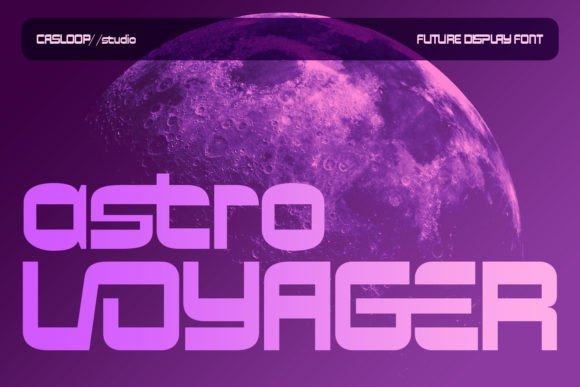
Astro Voyager: The Cool and Futuristic Display Font for Modern Design
Fonts are more than just letters on a page—they’re the visual heartbeat of your message. Choosing the right typeface can elevate your design, convey the right tone, and even influence how people perceive your brand or project. One standout in the world of display fonts is Astro Voyager. With its sleek, futuristic aesthetic, this font blends dynamic angles and smooth curves to create a look that feels both advanced and approachable. It’s ideal for anyone working on tech-themed websites, app interfaces, branding materials, or creative projects where modernity and clarity go hand-in-hand.
Why Astro Voyager Stands Out
Astro Voyager isn’t just another decorative font—it’s a carefully crafted typeface designed with balance and readability in mind. While it has a bold, space-age appearance, it maintains sparse proportions that give it a sense of forward-thinking minimalism. Its Latin-based structure ensures that each character remains familiar enough to be instantly readable, which is especially important when you're aiming for impact without confusion.
This font shines in environments where technology and innovation are key themes. Think of product launches, startup landing pages, sci-fi themed content, or even educational materials about emerging trends. Whether you're designing a logo, a headline, or a presentation slide, Astro Voyager brings a unique energy that stands out from the crowd while staying grounded in usability.
Common Mistakes When Using Astro Voyager
Despite its strengths, many designers make subtle missteps when using Astro Voyager, often leading to less-than-ideal results. Here are some common pitfalls and how to avoid them:
- Overusing it in body text: Display fonts like Astro Voyager are not built for long paragraphs. Their stylized forms and spacing work best at larger sizes and limited usage. Using them in body copy can strain readability and dilute their intended effect.
- Ignoring contrast in color schemes: The clean lines and futuristic vibe of Astro Voyager mean it needs sufficient contrast to remain legible. Pairing it with muted or overly complex backgrounds can obscure its details and reduce impact.
- Mismatching with supporting fonts: A strong display font should complement, not clash with, the rest of your typography. If you pair Astro Voyager with a similarly aggressive sans-serif, the result might feel chaotic rather than cohesive.
- Using it in all caps without consideration: Many display fonts lose their personality when used in all caps. Astro Voyager, however, is designed to retain its character in uppercase form—but only if used intentionally. Overdoing it can make the text feel rigid and unapproachable.
How These Mistakes Affect Your Project
Typography choices have real consequences. For example, if you use Astro Voyager as body text due to its bold presence, you risk making your content harder to read, which could turn off potential customers or users. Similarly, poor contrast between the font and background can lead to visual fatigue or even accessibility issues, especially for those with impaired vision.
Another issue arises when the supporting typefaces don't harmonize with Astro Voyager. This mismatch can cause your design to feel disjointed, confusing the audience and undermining the professional look you're trying to achieve. Remember, consistency in typography enhances user experience and brand recognition.
Better Approaches and Practical Tips
To make the most of Astro Voyager, consider these strategies:
- Use it sparingly: Save Astro Voyager for headlines, logos, or short impactful phrases. Reserve a more traditional sans-serif or serif font for body text to maintain readability.
- Test it across different screens: Because of its stylized design, always check how Astro Voyager appears on mobile devices, tablets, and monitors. Some characters may need extra padding or scaling to ensure they render clearly at smaller sizes.
- Pair it with a neutral base font: Try matching Astro Voyager with something like Inter, Roboto, or Lato. These fonts provide a solid foundation that lets the display font shine without overwhelming the layout.
- Adjust weight and spacing wisely: Don’t assume every weight of Astro Voyager will work equally well. The lighter weights may lack presence in digital environments, while heavier ones can become too intense for certain uses. Likewise, adjust letter spacing (tracking) to enhance legibility in large headers.
- Consider licensing before embedding: Before using Astro Voyager on a website or commercial project, confirm the license allows for such usage. Some free versions restrict web deployment or require attribution.
Real-World Examples and Use Cases
Let’s say you’re launching a new AI-powered productivity app. You want the homepage to feel innovative yet trustworthy. Instead of using Astro Voyager throughout the entire site, you could apply it to the main headline—something like “Welcome to the Future of Work”—while using a clean, modern sans-serif for the supporting text. This combination keeps the design fresh and functional.
In another scenario, imagine you're creating a poster for a science fair. The title reads "Exploring the Cosmos with AI." Astro Voyager would be perfect here because it adds a futuristic flair without being too busy. However, if you also use it for subheadings and descriptions, the overall design might become cluttered and hard to follow.
What to Check Before Committing to Astro Voyager
Before finalizing your choice, ask yourself these questions:
- Does my project benefit from a futuristic, high-tech aesthetic?
- Will the font scale well across different platforms and screen sizes?
- Am I using it in a way that supports legibility and doesn’t distract from the message?
- Do I understand the licensing terms? Are there any restrictions I need to be aware of?
- Is it compatible with the tools I’m using (e.g., Adobe Creative Suite, Figma, Canva)?
Answering these questions honestly can help you avoid costly mistakes down the line and ensure your design looks great both today and tomorrow.
Where to Find and How to Use Astro Voyager
If you're ready to try Astro Voyager, you’ll find it available through several reputable font marketplaces and foundries. Always download it from a trusted source to avoid corrupted files or malware. Once installed, experiment with it in your favorite design software to see how it fits into your workflow.
For web developers, consider using Google Fonts or Adobe Fonts to host the font if available. Otherwise, opt for self-hosting by downloading the WOFF or TTF file and linking it via CSS. Make sure to optimize the font size and line height for digital readability. A good starting point is 48px for headings with 1.5x line spacing.
Alternatives to Consider
While Astro Voyager is an excellent choice for futuristic designs, it's not always the best fit. Here are a few alternatives depending on your needs:
- Rounded Tech Fonts: If you prefer softer edges, look into typefaces like Space Mono or Orbitron, which offer a similar futuristic vibe but with more rounded shapes.
- Minimalist Sans-Serifs: For a cleaner, more professional look, consider Montserrat or Poppins, both of which pair well with bolder display fonts like Astro Voyager.
- Custom Brand Fonts: If your project requires a unique identity, explore commissioning a custom typeface that mirrors the essence of Astro Voyager but aligns perfectly with your brand guidelines.
Final Thoughts on Making Smart Typography Choices
The right font can transform your design from ordinary to extraordinary. Astro Voyager offers a compelling blend of style and functionality for modern, tech-forward projects. But remember, the key to successful typography lies in thoughtful application and understanding the context in which the font will appear.
By avoiding overuse, ensuring proper contrast, and selecting complementary typefaces, you can harness the full potential of Astro Voyager. As you move forward, take time to test, tweak, and refine your typographic choices. After all, great design isn’t just about looking cool—it’s about communicating clearly and effectively with your audience.