Nightmare Entity: Integrating a Spooky Display Font into Your Design Workflow
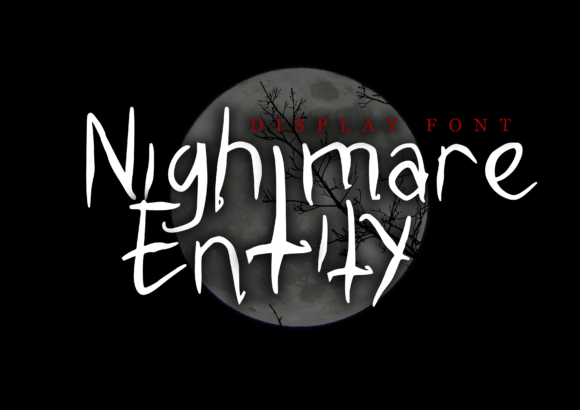
Fonts play a crucial role in visual communication, especially when it comes to setting the tone or mood of a project. Nightmare Entity is a display font that stands out for its dark, eerie aesthetic, drawing inspiration from horror movies and death metal music. Its jagged, sinister appearance makes it ideal for projects that require a dramatic or unsettling vibe. Whether you're working on Halloween-themed content, branding for a niche genre, or album art that needs an edge, Nightmare Entity can be a powerful tool in your design arsenal.
Understanding the Purpose of Nightmare Entity
Display fonts like Nightmare Entity are not meant for long-form text but rather for headlines, logos, titles, and other short visual elements where impact is key. The font's irregular structure and menacing style make it unsuitable for body copy, but perfect for creating memorable first impressions. It thrives in contexts where you want to evoke fear, rebellion, or darkness—such as posters, event banners, and themed merchandise.
In terms of workflow integration, Nightmare Entity is most effective during the conceptual and execution phases of a design project. It helps set the visual direction early on and adds a unique flair once applied. Because it's a display font, it’s often used in combination with more legible typefaces to maintain readability while enhancing the overall aesthetic.
When to Use Nightmare Entity in Your Projects
Timing is important when incorporating any design element. Here’s how Nightmare Entity fits into different stages of a creative process:
- Pre-Project Planning: During the ideation phase, consider whether Nightmare Entity aligns with your brand voice or theme. If you're designing for a horror film festival, a black metal band, or a haunted house attraction, this font could help define the look before you begin executing the visuals.
- During Execution: When building the actual design—whether in Photoshop, Illustrator, or Canva—Nightmare Entity can be applied to headlines, taglines, or call-to-action sections. It works well when paired with dark color palettes and high contrast lighting to emphasize its spooky characteristics.
- Post-Production Adjustments: After completing a design, Nightmare Entity might need fine-tuning to ensure it complements the rest of the layout. This includes adjusting letter spacing, adding drop shadows, or layering textures over the text to enhance depth and atmosphere.
Use Cases for Nightmare Entity
Here are some practical scenarios where Nightmare Entity shines:
- Halloween Marketing Materials: From flyers to social media posts, using Nightmare Entity can instantly transform a standard design into something hauntingly engaging. For example, a local haunted house promotion can use this font for the title to grab attention and build anticipation.
- Album Covers and Music Branding: Death metal bands or experimental artists looking to push boundaries with their visuals will find Nightmare Entity a compelling choice. It adds a raw energy that matches the intensity of the music it represents.
- Event Posters and Themed Merchandise: Whether it's a horror convention, a gothic fashion show, or a limited-edition t-shirt line, Nightmare Entity brings a sense of urgency and intrigue to the design.
- Book Titles and Movie Trailers: For independent filmmakers or authors in the horror genre, Nightmare Entity can serve as the primary typographic element to establish the tone of the story or film.
Pairing Nightmare Entity with Other Tools and Assets
Like any strong typographic choice, Nightmare Entity benefits from thoughtful pairing with supporting design elements. Here’s how it interacts with common tools and resources:
- Graphic Design Software: Nightmare Entity integrates smoothly with Adobe Creative Suite, Figma, and even free platforms like Canva. In these tools, you can experiment with effects such as gradients, strokes, and blending modes to customize the font further.
- Color Theory: The font's dark nature pairs best with monochromatic or high-contrast color schemes. Using deep blacks, blood reds, or shadowy purples can enhance its ominous feel. Avoid pastels or overly bright colors unless you’re intentionally going for a surreal effect.
- Imagery and Backgrounds: To maximize impact, place Nightmare Entity over images with dim lighting, foggy landscapes, or abstract textures. This creates a cohesive visual narrative that reinforces the font's character.
- Typography Hierarchy: Since it’s a display font, Nightmare Entity should typically be reserved for headlines or accents. Pair it with a clean sans-serif or serif font for subheadings and body text to maintain balance and readability.
Implementation Tips for Consistency and Quality
To ensure Nightmare Entity enhances your designs without overwhelming them, follow these implementation strategies:
- Limit Usage: Apply the font only to key visual elements. Overuse can lead to clutter and reduce its effectiveness. A single headline in Nightmare Entity can have more impact than multiple lines of text.
- Adjust Kerning and Leading: Due to its bold and uneven structure, careful tweaking of spacing between letters (kerning) and lines (leading) is essential. This ensures the text remains legible and visually appealing, especially at smaller sizes.
- Layer Effects Thoughtfully: Adding effects like outlines, shadows, or overlays can make the font pop, but too many can muddy the message. Test variations in your design software to see what maintains clarity while boosting the dramatic effect.
- Maintain Visual Balance: If you're using Nightmare Entity in a multi-font composition, ensure there’s a clear hierarchy. Let it dominate the main title while other fonts handle supporting information so the viewer isn’t lost in visual noise.
Workflow Example: Creating a Halloween Poster
Imagine you're tasked with designing a poster for a Halloween party. Here’s a streamlined approach using Nightmare Entity:
- Select a background image that evokes autumn or night scenes—think falling leaves, jack-o'-lanterns, or foggy graveyards.
- Open your design software and import the Nightmare Entity font. Choose a headline size large enough to command attention.
- Type the event name using Nightmare Entity. Adjust the spacing and add a subtle shadow to give it dimension.
- Add a secondary font for the date, time, and location details. Keep this font readable and consistent with the overall theme.
- Experiment with overlay textures such as torn paper, grunge effects, or ghostly silhouettes to blend the text seamlessly into the scene.
- Export the final design in multiple formats (JPEG, PNG, PDF) depending on where it’ll be used—online promotions, print materials, or signage.
Preparing for Long-Term Use
If you plan to use Nightmare Entity across multiple projects or campaigns, preparation is key to maintaining consistency and efficiency. Here are some tips for long-term integration:
- Build a Style Guide: Define how Nightmare Entity is used within your brand or project. Include examples of proper spacing, color combinations, and recommended use cases to guide future designers or collaborators.
- Organize Font Files: Store Nightmare Entity in a centralized typography folder. Label it clearly and include notes about licensing if it’s being shared with a team or used in client work.
- Consider Accessibility: While Nightmare Entity may not be accessible for reading large blocks of text, it’s perfectly suited for visual emphasis. Always provide alt-text descriptions or backup legible fonts for web accessibility purposes.
- Test Across Platforms: Before finalizing a design, test Nightmare Entity on different devices and screen sizes. Ensure it looks sharp and retains its intended effect on both desktop and mobile displays.
Enhancing Creativity with Nightmare Entity
Fonts like Nightmare Entity aren't just about aesthetics—they also influence the emotional response of your audience. When used correctly, they can heighten engagement and reinforce the message behind your design. For entrepreneurs launching a horror-themed product line, marketers promoting a thriller movie, or educators creating a Gothic literature presentation, Nightmare Entity can become a signature element that sets the tone from the start.
One way to leverage Nightmare Entity creatively is by using it in layered compositions. For instance, combining it with hand-drawn illustrations or digital assets that echo its spooky vibe can create a more immersive experience. You might also animate the text in video projects to simulate movement, like a crawling shadow or flickering candlelight.
Best Practices for Usability
While Nightmare Entity is visually striking, usability must remain a priority. Here are some considerations to keep your designs functional and impactful:
- Use it sparingly—only for short phrases or titles.
- Ensure sufficient contrast against the background for visibility.
- Check for compatibility across operating systems and design platforms.
- Avoid using it in small text sizes where clarity becomes an issue.
- Always back up Nightmare Entity with a secondary font in case of rendering issues.
Conclusion: Making the Most of Nightmare Entity
Nightmare Entity is more than just a creepy font—it's a strategic design choice that can elevate your visual storytelling. By understanding its purpose, knowing when to apply it, and integrating it thoughtfully into your workflow, you can harness its power to create compelling, high-impact designs. Whether you're an entrepreneur crafting a new brand identity, a marketer designing promotional material, or a creator producing album art, Nightmare Entity offers a bold typographic option that aligns with dark themes and dramatic visuals.
Remember, the goal is to enhance your message—not obscure it. With careful planning and execution, Nightmare Entity can become a valuable asset in your creative toolkit, helping you stand out in industries that thrive on atmosphere and emotion.