Dream World: The Chubby Display Font That Adds Whimsy to Your Designs
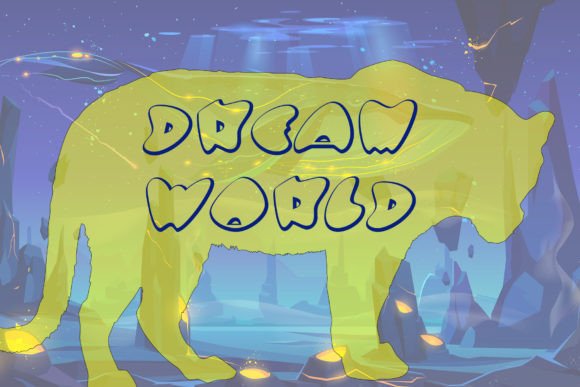
Typography is more than just selecting readable text—it's about crafting a visual experience that resonates with your audience. Among the many display fonts available, Dream World stands out as a unique and versatile choice. With its chubby, rounded letterforms and playful yet modern aesthetic, it invites users into a whimsical design landscape. Whether you're creating logos, social media content, packaging, or website headers, Dream World can bring charm and character to your work.
Why Designers Are Choosing Dream World
Dream World has become increasingly popular among creatives who want to infuse warmth and personality into their projects. Its bold, soft curves evoke a sense of nostalgia while still feeling fresh and contemporary. This makes it ideal for brands targeting younger demographics or those aiming for a fun, approachable vibe.
Many designers use this font in digital marketing campaigns, especially for products related to lifestyle, wellness, and entertainment. It works well in illustrations, animations, and even as part of a larger typographic system when paired with more neutral sans-serif or serif fonts. The chubby nature of the letters adds visual interest without overwhelming the viewer.
Common Misconceptions About Dream World
Despite its growing popularity, some people misunderstand how best to use Dream World. Here are a few common misconceptions:
- It’s only for kids’ stuff: While the playful look might suggest otherwise, Dream World can be used effectively in adult-oriented designs by adjusting contrast, spacing, and color choices.
- It’s too big to read: As a display font, Dream World isn’t intended for long paragraphs or body text. However, it shines when used correctly in short-form contexts like headlines or call-to-action buttons.
- It lacks versatility: When combined with complementary fonts, Dream World can support a wide range of branding styles—from fantasy-inspired themes to cozy café aesthetics.
Mistakes to Avoid When Using Dream World
Using a display font like Dream World incorrectly can lead to poor design outcomes. Let’s explore some key pitfalls and how to avoid them:
1. Forcing It Into Inappropriate Contexts
One of the biggest mistakes is using Dream World where it doesn’t fit. Because it’s a decorative typeface, it may not convey professionalism or clarity in all settings. For example, trying to use it for legal documents, technical manuals, or academic papers will likely confuse the message and dilute the brand voice.
Better Approach: Save Dream World for creative projects such as posters, invitations, app interfaces, or promotional banners. If you’re unsure whether it fits, ask yourself: Does this context require playfulness or whimsy? If yes, then Dream World could be a great fit.
2. Ignoring Legibility at Smaller Sizes
Display fonts often lose legibility when scaled down. Dream World, with its thick strokes and open shapes, is no exception. Many beginners overlook this and try to use it in small sizes, leading to cluttered or unreadable text.
Better Approach: Always test how Dream World looks at different sizes before finalizing a design. A good rule of thumb is to keep it above 24px on screens and ensure it’s used in high-contrast colors against its background. If you need smaller text, switch to a more structured companion font.
3. Overusing Special Characters Without Purpose
Some versions of Dream World include ligatures, alternate characters, and stylized glyphs. While these can add flair, they should be used thoughtfully. Randomly inserting special characters without a clear reason can make the design feel gimmicky rather than magical.
Better Approach: Use special features strategically—perhaps in logo titles or branded slogans where they enhance the mood. Don’t apply them across entire sentences unless the overall effect is intentional and consistent with your brand identity.
How to Choose the Right Version of Dream World
Dream World may come in multiple weights, styles, or variations. Understanding what each offers is crucial before making a purchase or download decision.
- Check Licensing Terms: Make sure the version you choose is appropriate for your project. Some free versions restrict commercial use, while premium ones offer full rights for print, web, and product design.
- Consider the Format: Ensure the font is compatible with your software and platforms. Common formats include TTF (TrueType) and OTF (OpenType), both widely supported but with slight differences in rendering and advanced features.
- Look for Accents and Language Support: If your design includes non-English characters or multilingual text, confirm the font supports those accents and symbols to maintain consistency and professionalism.
Realistic Example of Proper Usage
Imagine designing a promotional poster for a children’s book launch. You decide to use Dream World for the title. But if you also use it for the author bio and event details, the poster becomes visually overwhelming. Instead, pair Dream World with a clean sans-serif font like Montserrat or Open Sans for supporting text. This creates a balanced layout where the whimsy of the title doesn’t clash with the readability of the information below.
When Dream World Might Not Be the Best Choice
Even the most beautiful fonts have limitations. Dream World is not always the right pick. Consider these scenarios:
- High-speed reading environments: Such as e-books, websites with dense text, or signage in busy locations. Readers need quick recognition, which Dream World can hinder due to its decorative style.
- Minimalist or corporate branding: If your brand relies on sleek, modern aesthetics, Dream World could appear out of place or unprofessional.
- Low-resolution printing: The fine details in Dream World may not render clearly on lower quality prints. Always preview your design at the intended output size and resolution.
In these cases, consider alternatives like Raleway, Lato, or Futura for a more streamlined look. These fonts can coexist with Dream World in mixed typography setups, allowing you to balance creativity with clarity.
Pro Tips for Maximizing Dream World in Your Projects
To get the most out of Dream World, follow these practical tips:
- Use Color Thoughtfully: The soft, bubbly appearance of Dream World pairs beautifully with pastel tones or vibrant gradients. Avoid overly bright or clashing colors that distract from the font’s charm.
- Pair with Simplicity: As mentioned earlier, pairing Dream World with a simple base font helps guide the eye and maintains hierarchy. Think of it as the “icing” on the cake—delicious but not meant to be the whole dish.
- Optimize for Accessibility: Even whimsical fonts must remain accessible. Ensure there’s enough contrast between the text and background, and avoid using it in ways that compromise readability for users with visual impairments.
- Test Across Devices: How Dream World looks on a desktop screen can differ significantly on mobile devices. Always check responsiveness to ensure it retains its appeal and usability across all platforms.
Where to Find and Purchase Dream World
If you’re interested in using Dream World in your professional work, it’s essential to source it legally. You can find it on reputable font marketplaces like Adobe Fonts, Google Fonts, or directly from the designer’s portfolio site. Always verify the license agreement to understand usage rights and restrictions.
For personal or hobbyist projects, some platforms offer limited-use free versions. But remember, these usually don’t allow commercial applications. If you plan to sell products featuring the font, invest in the correct license to avoid potential legal issues later on.
Final Thoughts on Dream World and Typography Choices
Choosing the right font can elevate your design from average to exceptional. Dream World brings a touch of magic to any project, but like any tool, it needs to be used wisely. By understanding its strengths and limitations, you can harness its charm without compromising functionality or user experience.
Before committing to Dream World, take time to evaluate your design goals, audience expectations, and technical requirements. Ask yourself: Will this font help tell my story better? Does it align with the tone I’m trying to set? If the answer is yes, go ahead—but use it with intention and care.
With thoughtful application, Dream World can transform your creative output into something truly memorable. Just remember to let the purpose of your design guide your font choices, and you’ll be well on your way to creating visuals that resonate with your audience.