Kontry: A Modern Display Font for Impactful Design
Fonts play a crucial role in design, and choosing the right one can elevate your project from ordinary to extraordinary. Kontry is a fun and cool display font that has been making waves among designers and content creators alike. With its bold, stylized letterforms and modern aesthetic, it’s perfect for headlines, logos, branding, and other attention-grabbing applications. However, like any design tool, using Kontry effectively requires more than just picking it out of a list. In this article, we’ll explore what makes Kontry stand out, common mistakes people make when working with it, and how you can avoid those pitfalls to ensure your designs look their best.
What Makes Kontry Unique?
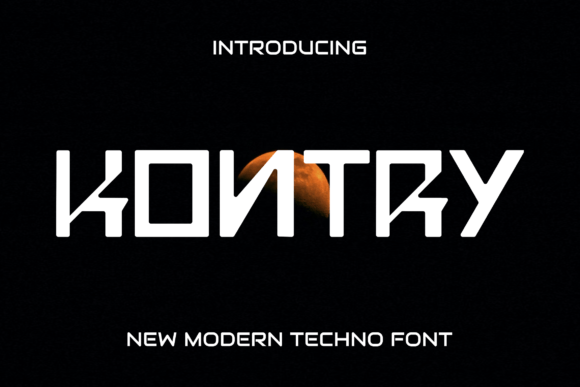
Kontry is a display font known for its clean yet edgy personality. It blends contemporary shapes with a slightly playful attitude, making it ideal for projects where you want to capture attention without overwhelming the viewer. Whether you're designing a website banner, social media graphic, or promotional material, Kontry adds a touch of sophistication and flair.
One of the key reasons people choose Kontry is its versatility. While it may seem bold at first glance, it works surprisingly well in both digital and print formats. The font’s high contrast between thick and thin strokes gives it visual interest, while its structured baseline ensures readability when used appropriately.
Who Can Benefit from Using Kontry?
- Graphic designers looking to add a modern edge to their work.
- Entrepreneurs creating brand identities that reflect innovation and confidence.
- Bloggers and marketers who need eye-catching headlines for online content.
- Educators and presenters aiming to make slides more engaging and dynamic.
Common Mistakes When Choosing and Using Kontry
Despite its appeal, many users make missteps when incorporating Kontry into their designs. These errors often stem from misunderstandings about the font's purpose, limitations, or compatibility. Here are some of the most common ones:
Using Kontry for Body Text
Display fonts like Kontry are not meant for long passages of body text. Their exaggerated features—such as uneven stroke weights and unique character spacing—can make reading difficult over extended sections. This is especially true in smaller sizes or on screens with lower resolution.
Better approach: Reserve Kontry for headlines, titles, and short phrases. Pair it with a complementary sans-serif or serif font for body text to maintain legibility and balance.Ignoring Kerning and Tracking Adjustments
Kontry’s bold and expressive style means that default spacing might not always deliver the best results. Some letters have tight curves or unusual proportions, which can cause awkward gaps or overlaps if left unadjusted.
Example: If you use Kontry for a logo, such as “Kontry Coffee,” the space between “C” and “o” might appear too wide by default, disrupting the visual flow. Solution: Always manually adjust kerning and tracking to fine-tune the appearance. Most design software like Adobe Illustrator or Photoshop allows you to tweak these settings easily for better alignment and aesthetics.Not Checking License Terms Before Use
A surprising number of users overlook the licensing agreement when downloading or purchasing Kontry. This can lead to legal issues, especially if they plan to use it in commercial projects or distribute it publicly.
What to do: Before finalizing your design, double-check the font license. Make sure you understand whether it’s suitable for personal or commercial use, web embedding, or redistribution. You can find this information on the official FontBundles page or the seller's site.How to Get the Most Out of Kontry
To truly harness the potential of Kontry, consider the following tips and tricks that help prevent common errors and enhance usability:
Pair It with the Right Fonts
Display fonts shine brightest when paired with more subdued typefaces. For instance, combining Kontry with a minimalist sans-serif like Montserrat or a classic serif like Lora creates a strong visual hierarchy. This pairing helps guide the reader’s eye from the headline to the supporting content smoothly.
Use It Sparingly for Maximum Effect
Because Kontry is so distinctive, it can quickly become overwhelming if overused. Limit it to key elements where impact matters most. For example, using it only for your main title in a presentation can draw focus without distracting from the rest of the slide.
Test It on Different Devices and Sizes
Always preview your design across various platforms and screen sizes. Kontry looks great on desktops, but it may not render as clearly on mobile devices or in email clients. Testing early can save you time and frustration later, ensuring your message remains clear and professional wherever it appears.
When Not to Use Kontry
Understanding when to avoid Kontry is just as important as knowing when to use it. Here are scenarios where it may not be the best choice:
- Formal documents: Its casual tone doesn’t suit resumes, legal contracts, or academic papers.
- High-volume text: As mentioned earlier, it’s not ideal for paragraphs or dense blocks of copy.
- Low-resolution prints: If you’re printing materials like business cards or flyers at low resolution, Kontry’s details may blur or distort.
In each of these cases, opting for a more traditional or readable font will likely yield better results and maintain professionalism.
Practical Tips for Downloading and Evaluating Kontry
If you're considering adding Kontry to your toolkit, here’s how to evaluate and acquire it responsibly:
Preview Before Purchase
Most font marketplaces offer free previews of Kontry. Take advantage of these to test it in your intended context. See how it looks with your brand colors, on different backgrounds, and in varying sizes. This step can prevent costly returns or redesigns down the line.
Compare Alternatives
Before committing to Kontry, compare it with similar display fonts. Look at options like Bebas Neue, Bangers, or Black Ops One to see which aligns best with your design goals. Consider factors like weight variation, legibility, and stylistic consistency across uppercase and lowercase characters.
Download from Reputable Sources
Always download Kontry from trusted platforms like FontBundles, Adobe Fonts, or other verified font sellers. Avoid piracy or unauthorized downloads, which can compromise security and violate copyright laws.
Real-World Applications of Kontry
Let’s take a look at how Kontry can be used effectively in real-life design situations:
Case Study: Brand Logo Design
A local coffee shop wanted to rebrand with a fresh, modern look. They chose Kontry for their logo because it conveyed energy and creativity. However, they initially struggled with how to pair it with other elements. By using a soft gray background and a minimalist sans-serif for the tagline, they created a balanced and memorable design that stood out in their community.
Case Study: Social Media Post
A fitness influencer was creating a motivational post for Instagram. She used Kontry for the main call-to-action phrase, “Push Harder.” But she didn’t realize that the font’s sharp angles clashed with her warm color palette. After adjusting the color and adding subtle shadows, the design felt cohesive and inspiring.
Final Thoughts on Choosing and Using Kontry
Kontry is a powerful addition to any designer’s font collection, but it’s essential to use it wisely. Recognize its strengths and limitations, pair it with appropriate fonts, and always verify licensing terms before deployment. By avoiding common mistakes and applying thoughtful adjustments, you can create stunning visuals that resonate with your audience and reflect your brand’s personality.
Remember, the goal of typography is to communicate clearly and effectively. Kontry can be a valuable tool in achieving that, but only when used with care and consideration. So next time you’re brainstorming a design, think about where Kontry can add value—and where it might actually subtract from it.