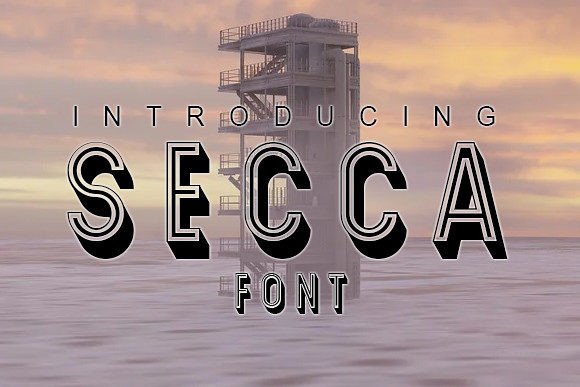
Secca: A 3D Typeface That Elevates Your Design Workflow
Designing for impact requires more than just visual appeal—it demands the right tools at every stage of the creative process. One such tool that’s making waves in the design community is Secca, a bold and versatile 3D typeface that adds depth, character, and professionalism to your work. Whether you're crafting posters, flyers, or other print and digital materials, Secca offers a unique way to communicate ideas with clarity and creativity.
Understanding Secca’s Role in Design Projects
Secca isn’t just another font; it’s a strategic asset in any designer's toolkit. As a 3D typeface, it brings a tactile quality to text, allowing designers to create eye-catching visuals without overcomplicating their layouts. This makes it especially valuable during the early stages of a project when establishing tone and style are key. It can be used as a headline to draw attention, in body copy for consistency, or even in layered compositions to add dimensionality.
Incorporating Secca into your workflow begins with understanding its purpose. It fits well into branding projects where a strong typographic identity is needed, editorial designs looking to break through clutter, and promotional materials that require a memorable visual punch. Its geometric structure and subtle textures give it an edge over flat fonts, making it ideal for both high-end and casual design applications.
Using Secca Before, During, and After Design Projects
Before starting a new project, consider how typography will support your message. Secca can be part of your initial mood board or concept sketch if you want to set a futuristic or modern tone. When paired with minimalist color palettes and clean imagery, Secca helps establish a cohesive look from the get-go.
During the execution phase, Secca shines in graphic design software like Adobe Photoshop, Illustrator, and InDesign. These platforms allow you to manipulate the 3D elements of the font, adjusting shadows, angles, and lighting to match your project’s aesthetic. You can also pair it with vector-based tools or 3D modeling programs such as Blender or Cinema 4D for advanced effects, giving your designs a polished, multidimensional feel.
After the project is complete, Secca continues to serve by reinforcing brand identity across multiple touchpoints. For example, if you created a poster using Secca, you can maintain visual consistency on social media graphics, email templates, and packaging by using the same font family. This reinforces recognition and builds trust with your audience over time.
Secca in Action: Real-World Use Cases
- Posters: Secca works exceptionally well for event posters, especially those promoting tech conferences, product launches, or modern art exhibitions. The 3D effect draws the eye and gives the poster a dynamic feel.
- Flyers: Whether you're designing a flyer for a music festival or a local business promotion, Secca adds a sense of urgency and energy. Its bold presence ensures your message stands out in crowded environments.
- Web Design: Though primarily used in print, Secca can also enhance web headers and landing pages. When converted into web-safe formats or embedded via CSS, it maintains its visual integrity and enhances user experience through striking headlines.
- Packaging: Secca’s ability to integrate seamlessly with product photography and mockups makes it a top choice for packaging design. Its dimensional qualities help logos and labels pop off shelves or screens.
Integration Tips for Smooth Workflow Execution
To make the most of Secca, start by evaluating your existing design assets and tools. Ensure compatibility with your preferred design software before downloading or purchasing the font. Most professional-grade 3D fonts come in OTF or TTF formats, which are widely supported across platforms.
When integrating Secca into your design system, define its use cases clearly. Ask yourself:
- Where will this font have the most visual impact?
- Does it align with the overall tone of the project?
- Will it work well with the supporting colors and imagery?
For freelancers and small businesses, maintaining a library of compatible fonts—including Secca—is essential. Group it with similar styles for easy access and use naming conventions that reflect its purpose (e.g., “Secca – Bold Headers” or “Secca – Branding Elements”). This promotes consistency and streamlines future projects.
Workflow Examples with Secca
Example 1: Event Poster Creation
Start by selecting a dark background to highlight Secca’s contrasting tones. Add the event title using the 3D version of the font and adjust the extrusion depth in Illustrator. Layer in supporting information using a lighter weight of Secca or a complementary sans-serif font. Finally, export the design in high resolution for print and digital distribution.
Example 2: Social Media Graphics
Use Secca sparingly but effectively for Instagram Stories or Facebook ads. Apply a gradient overlay to the font in Photoshop to simulate lighting effects. Pair it with simple icons and short captions to keep the focus on the main message while still delivering a premium look.
Example 3: Logo Mockup Testing
Create a few variations of your logo using different weights and orientations of Secca. Test them on mockups of business cards, t-shirts, and signage using online tools like Placeit.net. This helps visualize how the font performs across various mediums and scales.
Factors to Consider When Using Secca
While Secca is a powerful addition to your typography arsenal, there are several factors to keep in mind to maximize its effectiveness:
Preparation
Before using Secca, gather all necessary design components—images, colors, and supporting fonts. Know the context in which it will appear and whether the 3D aspect is appropriate for the medium. For instance, a high-resolution billboard may benefit from its depth, while a mobile ad might need a simpler application to avoid overwhelming the viewer.
Compatibility
Check that your design software supports 3D rendering features. If not, some versions of Secca may only offer flat alternatives. Also verify licensing terms to ensure it’s suitable for commercial use. Many foundries provide detailed guidelines on usage rights, so review these carefully before implementation.
Usability
Despite its 3D appearance, Secca remains legible. However, readability can diminish if too many effects are applied. Stick to subtle enhancements unless the goal is to create an artistic statement. Always test the font at different sizes and resolutions to confirm it remains clear and professional.
Organization
If you’re working in a team environment, share Secca with colleagues through cloud storage or font management systems like FontBase or Suitcase Fusion. Document its intended use within style guides to prevent misuse and maintain brand consistency. This also saves time when revisiting old projects or scaling new ones.
Efficiency
Secca can speed up your design process by reducing the need for custom illustrations or icons. Instead of creating complex 3D lettering from scratch, apply the font and tweak its properties to fit your needs. This efficiency is especially useful for entrepreneurs and marketers who must produce content quickly without sacrificing quality.
Consistency
Define how Secca will be used across all platforms. Will it always appear in uppercase? What about spacing and alignment? Establishing rules ensures your message stays consistent and your brand feels cohesive. This is vital for long-term marketing strategies and customer retention.
Quality Control
Review all final outputs for technical issues like pixelation or misalignment. High-quality renderings of Secca are crucial for print materials, where details matter. Set proofing steps in your workflow to catch errors early and maintain a professional finish.
Long-Term Use
Plan for how Secca will evolve with your brand. Will it remain a staple in all communication channels, or will it be retired after a specific campaign? Keep an archive of previous uses to reference later, and update your font collection periodically to stay current with design trends.
Why Choose Secca Over Other Typefaces?
Secca stands out due to its balance between form and function. Unlike overly stylized 3D fonts that compromise readability, Secca maintains a clean, structured appearance while offering enough visual flair to make your designs memorable. This dual advantage makes it adaptable across industries—from technology and fashion to education and entertainment.
Another reason to choose Secca is its flexibility. It can be manipulated easily in design software, allowing for quick adjustments without compromising quality. This adaptability is invaluable when iterating on concepts or responding to client feedback mid-project.
Best Practices for Maximizing Impact
Here are a few best practices to follow when working with Secca:
- Limit effects: Avoid excessive drop shadows or gradients unless they serve a clear purpose. Let the font speak for itself.
- Pair wisely: Combine Secca with softer, more traditional fonts to create contrast and visual hierarchy.
- Test in context: View your design on actual devices or in real-world settings to see how Secca performs under different conditions.
- Stay updated: Check for font updates or new variants that may expand its usability in upcoming projects.
Conclusion: Making the Most of Secca in Your Creative Process
Secca is more than just a 3D typeface—it’s a design solution that bridges the gap between creativity and practicality. By integrating it thoughtfully into your workflow, you can elevate your projects without overcomplicating your process. From posters and flyers to digital campaigns and branding efforts, Secca proves itself as a reliable and impactful tool.
Whether you're a seasoned designer or just starting out, choosing the right font is a critical step in achieving your goals. With its clean lines, dimensional appeal, and broad compatibility, Secca is a smart investment for anyone serious about their visual output. Use it to enhance your message, streamline your design tasks, and deliver results that stand out in today’s competitive landscape.